
Introduction
Business content plays an important role in how a company communicates with customers, prospects, employees, and partners. Website pages, blog articles, product descriptions, emails, social media posts, advertisements, FAQs, newsletters, and other business materials all require clear and consistent communication.
For many businesses, creating this content manually can take significant time. Teams may need to research topics, create outlines, write drafts, adapt content for different channels, optimize copy for search engines, and repeatedly edit similar materials.
MagicAI for business content creation can help streamline many of these activities by providing AI-assisted writing, custom templates, article generation, product descriptions, social media content, advertising copy, email generation, newsletters, FAQs, rewriting, summarization, and other content-generation capabilities. MagicAI also supports custom prompts and templates, allowing businesses to create repeatable workflows.
The goal should not be to publish AI-generated content without review. Instead, businesses can use MagicAI to accelerate drafting and repetitive work while keeping strategy, accuracy, brand standards, and final approval under human control.
What Is Business Content Creation?
Business content creation is the process of producing written or visual material that helps a company communicate with its audience and achieve a business objective.
Common examples include:
- Website content
- Blog articles
- Product descriptions
- Service pages
- Landing pages
- Social media posts
- Email campaigns
- Newsletters
- Advertisements
- FAQs
- Case-study drafts
- Business proposals
- Internal documentation
- Customer communication
- SEO content
Business content usually needs to be more than grammatically correct. It should be accurate, audience-focused, consistent with the company’s voice, and aligned with a specific purpose.
What Can MagicAI Do for Business Content?
MagicAI provides an AI writing assistant along with custom templates for different content requirements. Its current platform includes tools such as Article Generator, Product Description, Blog Post Ideas, Blog Intros, Blog Conclusion, Meta Description, FAQ Generator, Email Generator, Newsletter Generator, social media templates, advertising templates, AI ReWriter, File Analyzer, and other AI-powered tools.
A business can use these capabilities to support the content lifecycle:
PLAN → WRITE → EDIT → OPTIMIZE → REVIEW → PUBLISH
MagicAI also allows users to provide basic information or keywords, generate an output, and then view, edit, or export the result.
Why Use MagicAI for Business Content Creation?
1. Save Drafting Time
Instead of starting every document from a blank page, teams can generate a structured first draft and then improve it.
2. Generate More Content Ideas
AI can help brainstorm topics, headlines, campaign concepts, and content angles.
3. Maintain Consistent Structures
Reusable prompts can help teams follow the same content framework for recurring tasks.
4. Repurpose Existing Content
One article can be transformed into social posts, email ideas, FAQs, summaries, and other formats.
5. Support Small Marketing Teams
A small team can use AI assistance for repetitive writing while spending more time on strategy and customer research.
6. Create Multiple Variations
Marketing teams can quickly develop alternative headlines, introductions, CTAs, and campaign messages for review.
Step 1: Define the Business Content Goal
Before opening MagicAI, determine what the content needs to accomplish.
Possible goals include:
- Generate leads
- Educate customers
- Explain a product
- Improve SEO visibility
- Promote an offer
- Build brand awareness
- Support customers
- Announce a product update
- Increase engagement
- Improve conversions
Example
Instead of:
Write a blog about accounting software.
Use:
Create an educational blog article for small-business owners explaining how accounting software can reduce manual financial administration. The goal is to educate readers and encourage them to explore our software.
The second instruction provides context and direction.
Step 2: Define the Target Audience
Business content should be written for a specific audience.
Provide MagicAI with information such as:
- Customer type
- Industry
- Experience level
- Common problems
- Goals
- Buying stage
- Knowledge level
- Preferred tone
Example
Target audience: small business owners who manage their own accounting and have limited technical knowledge.
This produces a much clearer content direction than simply saying “write for customers.”
Step 3: Provide Accurate Business Information
AI output becomes more useful when the input is specific.
Include:
- Company information
- Product details
- Features
- Benefits
- Services
- Target customers
- Pricing information, if appropriate
- Business differentiators
- Approved claims
- Brand voice
- Relevant keywords
Do not ask AI to guess important business information.
Step 4: Establish Your Brand Voice
A business should decide how its content should sound.
Possible brand voices include:
- Professional
- Friendly
- Technical
- Conversational
- Educational
- Premium
- Authoritative
- Simple
- Direct
Example Brand Voice Prompt
Use a professional but approachable tone. Keep sentences clear and concise. Avoid unnecessary jargon. Explain technical concepts in simple language and maintain a helpful, trustworthy voice.
A reusable voice instruction can then be included in future prompts.
Step 5: Create a Content Brief
A short content brief gives MagicAI the information needed to create a focused draft.
Business Content Brief
| Field | Example |
|---|---|
| Business | SaaS company |
| Audience | Small businesses |
| Content Type | Blog article |
| Topic | Business automation |
| Goal | Educate and generate leads |
| Primary Keyword | business automation software |
| Tone | Professional and helpful |
| CTA | Request a demo |
| Length | 1,500–2,000 words |
This structure can be reused for future content.
Step 6: Generate the First Draft
Once the information is ready, ask MagicAI to produce the initial version.
Example Prompt
Write a detailed business article about [TOPIC] for [TARGET AUDIENCE].
Business objective: [OBJECTIVE]
Primary keyword: [KEYWORD]
Key information: [INFORMATION]
Brand voice: [VOICE]
Structure the article with a clear introduction, logical headings, useful examples, practical recommendations, FAQ section, and conclusion. Use only the supplied business information. Do not invent statistics, customer results, certifications, pricing, or product capabilities.
The first draft should be treated as a starting point rather than the final publication.
10 Practical Business Content Use Cases
1. Website Copy
MagicAI can help draft:
- Homepage copy
- About pages
- Service pages
- Product pages
- Feature sections
- FAQ sections
- CTA sections
Prompt
Create homepage copy for [BUSINESS]. Explain what the company offers, who it serves, the primary customer problem, key benefits, major differentiators, and next step. Keep the language clear and professional.
2. Blog Articles
Businesses can use MagicAI to brainstorm topics, develop outlines, write sections, and improve drafts.
MagicAI currently provides Article Generator, Blog Section, Blog Post Ideas, Blog Intros, Blog Conclusion, and AI Article Wizard tools.
Prompt
Create an SEO-focused blog outline for [TOPIC]. Include search intent, H2 and H3 sections, important customer questions, examples, FAQ opportunities, and a logical conclusion.
3. Product Descriptions
Product content should explain both what a product does and why it matters.
Prompt
Write a product description for [PRODUCT] using the supplied specifications and features. Explain the main customer benefits, applications, ideal user, and key differentiators. Do not invent specifications or performance claims.
4. Service Pages
Service businesses can use AI to create structured service-page drafts.
Include:
- Customer problem
- Service solution
- Process
- Benefits
- Applications
- FAQs
- CTA
5. Social Media Posts
MagicAI includes business-oriented social media templates that can support social content creation.
Prompt
Create 10 business social media posts for [COMPANY]. Include educational, industry-insight, customer-problem, product, and engagement posts. Keep the tone professional and avoid exaggerated claims.
6. Email Marketing
MagicAI provides email and newsletter generation templates.
Businesses can use AI assistance for:
- Welcome emails
- Product announcements
- Promotional emails
- Follow-ups
- Newsletters
- Customer education
- Event invitations
Prompt
Write a professional email announcing [UPDATE] to existing customers. Explain what changed, why it matters, what customers need to know, and the appropriate next step.
7. Advertising Copy
MagicAI provides advertising-oriented templates including Facebook Ads, Facebook Headlines, and Google Ads Description.
Prompt
Generate five advertising concepts for [PRODUCT]. Each should contain a headline, benefit-focused message, supporting copy, and CTA. Use only verified product information and avoid unsupported guarantees.
8. FAQs
FAQs can reduce repetitive customer questions and improve website usefulness.
Prompt
Generate 20 frequently asked questions about [PRODUCT/SERVICE]. Include questions about features, setup, applications, limitations, support, pricing information provided below, and next steps. Mark any question that cannot be answered from the supplied information.
9. Business Document Summaries
Businesses regularly work with long documents.
MagicAI’s current File Analyzer can work with uploaded PDF, CSV, DOC, and DOCX files to extract key insights or summarize documents.
Prompt
Summarize this document for a business manager. Extract the main findings, important facts, action items, risks, unanswered questions, and decisions that require human attention.
10. Rewriting and Content Improvement
Existing content can be improved for:
- Clarity
- Grammar
- Readability
- Professional tone
- Conciseness
- Structure
- Audience relevance
MagicAI currently includes an AI ReWriter designed to rewrite content in a more professional and detailed manner.
Prompt
Rewrite the following business content for clarity and professionalism. Preserve the original meaning and factual information. Remove repetition, improve structure, and make the language more customer-focused.
How to Use MagicAI for SEO Business Content
SEO content needs both useful information and search-focused structure.
A practical workflow is:
TOPIC → KEYWORD → SEARCH INTENT → OUTLINE → MAGICAI → EDIT → SEO REVIEW → PUBLISH
SEO Elements to Consider
Primary Keyword
Choose the main search phrase the page should target.
Secondary Keywords
Use closely related terms naturally.
Headings
Create clear H2 and H3 sections that help readers navigate the page.
Meta Title
Keep the title descriptive and relevant to the search intent.
Meta Description
Summarize the page clearly and encourage qualified clicks.
FAQs
Address real customer questions where appropriate.
Internal Links
Connect related pages to improve navigation and content discovery.
Human Review
Check all claims, examples, statistics, and business information before publication.
MagicAI currently includes SEO-related templates such as Article Generator and Meta Description, along with blog and FAQ tools.
How to Repurpose Business Content with MagicAI
A strong business content system should not require creating every asset from scratch.
For example:
ONE BLOG ARTICLE
can become:
- 3 LinkedIn posts
- 5 short social posts
- 1 newsletter
- 5 FAQs
- 3 email ideas
- 5 sales talking points
- 3 ad concepts
Repurposing Prompt
Repurpose the following business article into three LinkedIn posts, five short social posts, one newsletter, five customer FAQs, three email concepts, and three advertising ideas. Preserve all factual information and maintain the original brand voice.
This can help businesses extend the useful life of existing content.
How to Create a Repeatable MagicAI Business Content Workflow
A repeatable process makes AI more useful than one-off prompting.
Use:
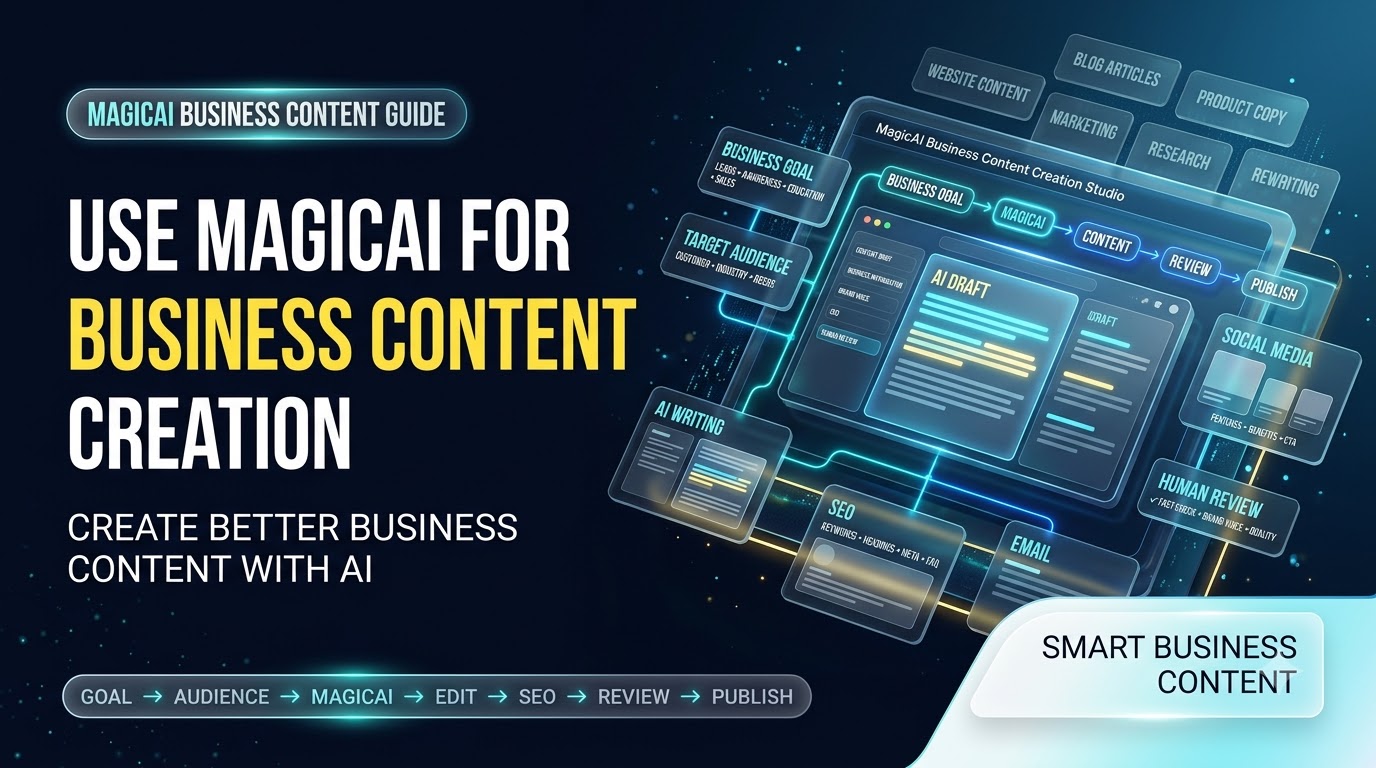
BUSINESS GOAL → AUDIENCE → INFORMATION → CONTENT BRIEF → MAGICAI → EDIT → FACT-CHECK → SEO → APPROVAL → PUBLISH
For recurring content, save the most effective prompts and instructions.
MagicAI supports custom templates and custom prompts, which can help businesses build repeatable content-generation processes.
Master Prompt for Business Content Creation
Act as a professional business content writer for [COMPANY NAME].
Industry: [INDUSTRY]
Product/Service: [PRODUCT OR SERVICE]
Target Audience: [AUDIENCE]
Business Goal: [GOAL]
Content Type: [BLOG / WEBSITE PAGE / EMAIL / SOCIAL POST / PRODUCT DESCRIPTION / AD / FAQ]
Topic: [TOPIC]
Primary Keyword: [KEYWORD]
Supporting Keywords: [KEYWORDS]
Key Business Information: [INFORMATION]
Brand Voice: [VOICE]
CTA: [CTA]
Create a clear, useful, professional first draft based only on the supplied information.
Prioritize accuracy, customer relevance, readability, and logical structure.
Do not invent statistics, customer testimonials, certifications, product capabilities, pricing, guarantees, or business results.
Highlight any missing information that should be supplied before publication.
Make the final content easy for a human editor to review and refine.
10 Ready-to-Use MagicAI Business Content Prompts
Prompt 1: Business Blog
Write a detailed article about [TOPIC] for [AUDIENCE]. Explain the problem, solution, practical benefits, examples, common questions, and next steps.
Prompt 2: Website Homepage
Create professional homepage copy for [BUSINESS]. Include a value proposition, customer problem, solution, benefits, differentiators, trust section, FAQ, and CTA.
Prompt 3: Product Page
Create a product-page draft for [PRODUCT] using the supplied features, benefits, specifications, applications, target audience, and CTA.
Prompt 4: Service Page
Write a service-page draft for [SERVICE]. Explain the customer problem, service process, benefits, applications, FAQs, and CTA.
Prompt 5: LinkedIn Content
Create 10 professional LinkedIn posts for [BUSINESS] targeting [AUDIENCE]. Include educational, industry, customer-problem, product, and thought-leadership topics.
Prompt 6: Email Campaign
Create a three-email campaign for [CAMPAIGN]. Include subject lines, email copy, customer benefit, CTA, and recommended audience stage.
Prompt 7: Newsletter
Create a monthly newsletter for [BUSINESS]. Include one useful industry insight, one educational section, one business update, one customer-focused takeaway, and one CTA.
Prompt 8: FAQ
Create 20 FAQs for [PRODUCT/SERVICE]. Use only the supplied information and clearly identify questions requiring additional business input.
Prompt 9: Content Refresh
Improve this existing business article for readability, structure, accuracy, customer relevance, and SEO. Preserve all verified facts and identify unsupported claims.
Prompt 10: Content Repurposing
Turn this business article into LinkedIn posts, social media captions, an email, FAQs, advertising concepts, and a newsletter while preserving all original facts.
Common Mistakes When Using MagicAI for Business Content
1. Giving Too Little Information
Generic instructions usually create generic content.
2. Publishing Without Fact-Checking
AI-generated business content should be reviewed before publication.
3. Inventing Claims
Never allow the system to create unsupported:
- Statistics
- Customer results
- Testimonials
- Certifications
- Awards
- Guarantees
- Product specifications
4. Ignoring Brand Voice
Content should sound like the business, not like generic AI copy.
5. Focusing Only on Keywords
SEO should support useful content rather than replacing it.
6. Using One Prompt for Everything
A product description and a customer-support email have different goals and structures.
7. Over-Automating Customer Communication
Sensitive or important customer interactions often require human judgment.
Best Practices for Business Content Creation with MagicAI
Give Context
Tell MagicAI who the company serves, what it offers, and what the content needs to accomplish.
Use Structured Prompts
Separate audience, goal, information, format, voice, and CTA.
Create Reusable Templates
Save successful workflows for recurring content tasks.
Generate Multiple Versions
Compare different headlines, introductions, CTAs, and content angles.
Fact-Check Important Information
Especially verify technical specifications, statistics, legal claims, pricing, and customer results.
Edit for Brand Voice
The final content should reflect the company’s actual communication style.
Use Real Customer Insights
Customer interviews, support questions, reviews, and sales feedback can make AI-assisted content more relevant.
Keep Humans in the Approval Loop
AI can accelerate production, but final responsibility should remain with the business team.
MagicAI vs Manual Business Content Creation
| Activity | Traditional Workflow | MagicAI-Assisted Workflow |
|---|---|---|
| Idea generation | Manual brainstorming | AI-assisted ideas |
| First draft | Start from blank page | Generate initial draft |
| Blog outline | Manual research | AI-assisted structure |
| Product copy | Manual writing | AI-assisted draft |
| Write from scratch | Generate draft | |
| Social posts | Create individually | Generate variations |
| FAQs | Collect and write manually | AI-assisted question generation |
| Repurposing | Manual rewriting | AI-assisted adaptation |
| Editing | Manual | AI-assisted + human review |
| Final approval | Human | Human |
The most effective approach combines AI speed with human expertise.
Business Content Quality Checklist
Before publishing content generated or assisted by MagicAI, check:
- Is the business information accurate?
- Is the target audience clear?
- Does the content have a defined objective?
- Is the brand voice consistent?
- Are all product claims verified?
- Are statistics sourced or verified?
- Are there unsupported promises?
- Is the content useful to the reader?
- Are headings logically organized?
- Are keywords used naturally?
- Are CTAs relevant?
- Are internal links appropriate?
- Has a human reviewed the final version?
Frequently Asked Questions
Can MagicAI create business content?
Yes. MagicAI provides an AI writing assistant and multiple templates that can support articles, product descriptions, blog content, social media, advertising, emails, newsletters, FAQs, rewriting, and other business content workflows.
Can MagicAI create website content?
Yes. Businesses can use its writing capabilities and custom prompts to create first drafts for website pages, service descriptions, product content, FAQs, and other website materials.
Can MagicAI help with SEO content?
Yes. MagicAI includes tools such as Article Generator, Blog Post Ideas, Blog Section, Meta Description, FAQ Generator, and AI Article Wizard that can support different parts of an SEO content workflow.
Can MagicAI create social media content for businesses?
Yes. Its current templates include business-oriented social media posts, Instagram captions and hashtags, Facebook headlines, and other social content options.
Can MagicAI create email content?
Yes. MagicAI currently provides Email Generator, Email Answer Generator, and Newsletter Generator templates.
Can MagicAI rewrite existing business content?
Yes. MagicAI includes an AI ReWriter designed to rewrite content in a more professional and detailed way.
Should businesses publish AI-generated content without editing?
No. Business content should be reviewed for accuracy, brand voice, originality, claims, customer relevance, and compliance before publication.
Can MagicAI help small businesses?
Yes. Its range of writing, content, image, document, and custom-template capabilities can be useful for businesses that need to handle many content tasks with limited resources.
Final Verdict
How to use MagicAI for business content creation comes down to building a structured workflow rather than simply asking AI to “write something.”
A strong process looks like:
BUSINESS GOAL → AUDIENCE → INFORMATION → PROMPT → MAGICAI → EDIT → FACT-CHECK → SEO → APPROVAL → PUBLISH
MagicAI can support many stages of business content creation, from ideas and first drafts to rewriting, SEO-oriented content, emails, social media, product descriptions, FAQs, summaries, and visual content. Its current platform also supports custom prompts and templates, allowing businesses to create repeatable workflows.
The best results come when businesses provide accurate context, use specific prompts, maintain a consistent brand voice, and keep humans responsible for strategic decisions and final approval.
The goal is not simply to create more content.
The goal is to create useful business content faster, more consistently, and with better use of team resources.